Time trackingTime offTeam management
Every hour and every day off, in one workspace.
ArcusSuite gives studios, agencies and consultancies one place to log hours against projects, handle time off and manage who works on what.
Sign up with your email, confirm it, then name your organization.
A 20-second tour of ArcusSuite with the fictional Brightwave Studio: a late entry from 10:30 PM to 1:15 AM logged in Clocker, Priya Nair's time off request approved, and the dashboard's hours by project and by person.
One workspace
An app for each job, one place to sign in.
ArcusSuite is a workspace of focused apps that share the same people, projects and roles. Switch between them from the grid in the top corner.
Clocker
Log time against projects and see team hours on one dashboard.
Learn morePTOs & Holidays
Request time off, review it in one queue and keep balances in view.
Learn moreOrganization Management
Invite people, set roles and managers, and staff your projects.
Learn moreAssets ManagementComing soon
Keep track of the equipment your team works with.
Take a look
The real app, not a mock-up.
Every screen below is ArcusSuite as your team will use it, shown with a demo organization.


Entries grouped by week and day, with running totals.


Every request in one queue, ready to approve or decline.


Each person's balance, upcoming time off and history.


Roles, managers and tags for everyone in the workspace.


Who works on what, and how many hours a week.
Time tracking
Log time as you go, not at the end of the week.
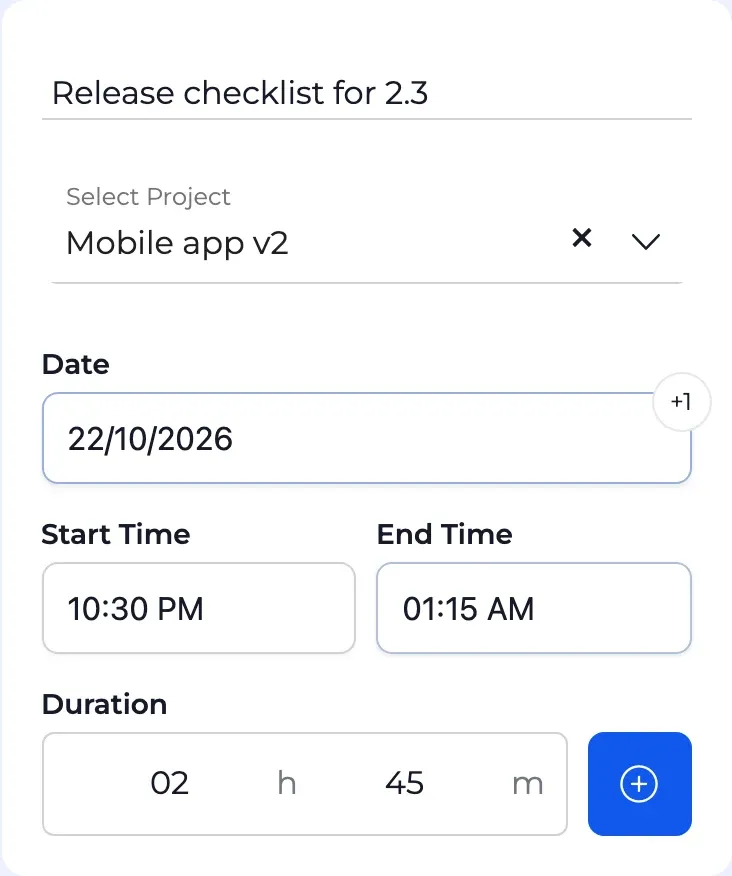
In the Clocker app, write what you worked on, pick the project and set the hours. Every entry stays in order and every total stays up to date.
Start, end or duration
Set the times, or type the duration and let Clocker work out the end. Shorthand like 9a or 130p is understood.
Late shifts included
An entry that runs past midnight is marked +1 day, so a night shift stays one entry.
Weekly and daily totals
Entries are grouped by week and by day, each with the hours logged so far.
Repeat work in one click
Duplicate an entry to log the same task again, or edit it in place.
Dashboard
See where the hours go.
The dashboard turns everyone's entries into one picture: hours per day, week or month, stacked by project, with the people behind each total.
Any period
This week, last month, this year, or a custom range from the calendar.
Filter by project or person
Admins see the whole organization. Team leaders see the people on their projects.
Totals you can act on
Every project's hours, broken down by the people who logged them.


Time off
Time off without the email chains.
In the PTOs & Holidays app, each paid time off (PTO) request goes to the person's manager, in one queue with everything needed to decide. Everyone always knows where they stand.
One queue for requests
Dates, hours per day and the reason, with Approve and Decline on every request.
Decline with a reason
Add a short note so the person knows why, and what might work instead.
Balances in plain view
Days remaining, days used and when the balance expires, next to upcoming time off and history.
Plans change
Cancel a pending or approved request and the days go back to the balance.


Team management
Your team, set up the way it actually works.
In the Organization Management app, people, roles, managers, projects and tags live in one place, and the rest of ArcusSuite follows from them.
Invite by email
Choose a role, a manager and tags before they even sign in. Pending invitations stay in view.


- AdminWorkspace
- UserWorkspace
- Team LeaderProject
- Team MemberProject
Roles that decide what people see
Admins run the workspace, users track their own time, and project roles add team leaders and members.
- Hannah Weiss (User)Reports to Priya Nair
- Priya Nair (User)Reports to Maya Okafor
- Maya Okafor (Admin)No manager
Reports to
Record who each person reports to, so the org chart lives where the work does and time off requests reach the right manager.
Projects with real staffing
Add people as team leaders or team members, with the hours a week each one gives the project.


Tags for every grouping
Design, Remote, Contractor: tag people any way you like and filter by it.


Built with care
Your team's data, handled the way you would.
The details that matter once real people are in the workspace.
Analytics only with consent
Usage analytics stay off until an admin turns them on, and then each member decides for themselves. Anything typed stays masked.
Access by role
Managing people and projects is reserved for admins. Everyone else sees their own work, team leaders see the hours on their projects, and managers see their team's time off requests.
Passwords we never see
Sign-in runs on Amazon Cognito, so your password is never seen or stored by ArcusSuite.
Encrypted on the way
Everything between your browser and ArcusSuite travels over HTTPS.
How it works
From sign-up to a tracked week.
- 1
Create your workspace
Sign up, confirm your email and name your organization.
- 2
Invite your team
Send invitations by email with a role, a manager and tags. Then set up your projects.
- 3
Track, review, approve
People log their time and request time off. You see the hours, and managers decide on their team's requests in one place.
Bring your team's time into one place.
Create your workspace, then invite your team.