The Clocker app
Time tracking your team will actually keep up with.
A quick entry for every piece of work, a running total for every day and week, and a dashboard that shows where the hours went.


Time tracking
Log time as you go, not at the end of the week.
In the Clocker app, write what you worked on, pick the project and set the hours. Every entry stays in order and every total stays up to date.
Start, end or duration
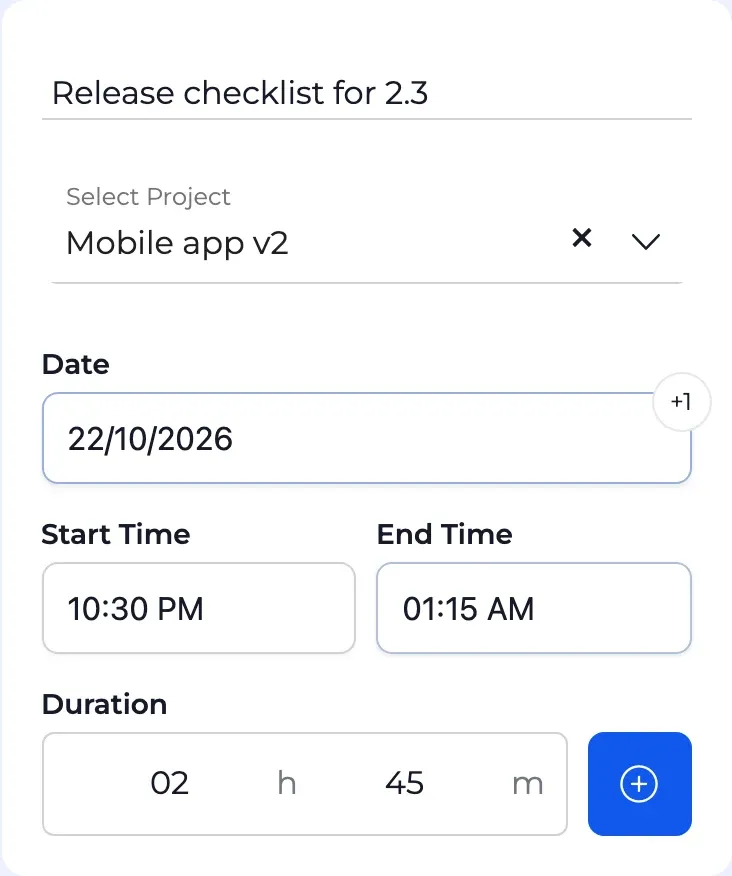
Set the times, or type the duration and let Clocker work out the end. Shorthand like 9a or 130p is understood.
Late shifts included
An entry that runs past midnight is marked +1 day, so a night shift stays one entry.
Weekly and daily totals
Entries are grouped by week and by day, each with the hours logged so far.
Repeat work in one click
Duplicate an entry to log the same task again, or edit it in place.
Dashboard
See where the hours go.
The dashboard turns everyone's entries into one picture: hours per day, week or month, stacked by project, with the people behind each total.
Any period
This week, last month, this year, or a custom range from the calendar.
Filter by project or person
Admins see the whole organization. Team leaders see the people on their projects.
Totals you can act on
Every project's hours, broken down by the people who logged them.


The details
Small things that save time every day.
Only your projects
The project picker lists the projects you belong to, so time lands in the right place.
The next entry follows on
After you save, the next entry starts where the last one ended.
Edits save as you type
Change a description, a project or a time in the list and it is saved, no extra step.
Colors that stay apart
Projects on the dashboard get distinct colors, ordered so neighbors stay apart for color-blind readers.
Start logging hours against your projects.
Create your workspace, add your projects and invite your team to the Clocker app.